Part 2: Frontend Integration & CI/CD Pipelines
Connect a Svelte/Astro frontend to a serverless backend and automate the entire deployment using GitHub Actions.
The Frontend: Astro + Svelte
For the frontend, I basically pulled a template online and vibecoded a few tweaks to suit my personal taste and preferences.
I used Astro for the main framework because it ships zero JavaScript by default, making the resume blazing fast. However, I needed interactivity for the Visitor Counter, so I used a Svelte island.
Handling the API Connection
One challenge was telling the frontend where the backend lives. Since the backend URL is generated dynamically by Azure (e.g., sagesta-resume-func.azurewebsites.net). I couldn’t hardcode it.
I solved this using an environment variable PUBLIC_API_URL which is injected during the build process.
<script lang="ts">  import { onMount } from "svelte";
  // This variable is filled by our CI/CD pipeline  const API_URL = import.meta.env.PUBLIC_API_URL;  let count = 0;
  onMount(async () => {    // Check localStorage to prevent spamming the API on refresh    const lastVisit = localStorage.getItem("portfolio_last_visit");
    // Call the API    const response = await fetch(`${API_URL}/visitor_count`);    const data = await response.json();    count = data.count;  });</script>
<div>  <span>{count} Visits</span></div>
The CI/CD Pipeline (GitHub Actions)
This is where the magic happens. I created a workflow .github/workflows/deploy.yml that links everything together.
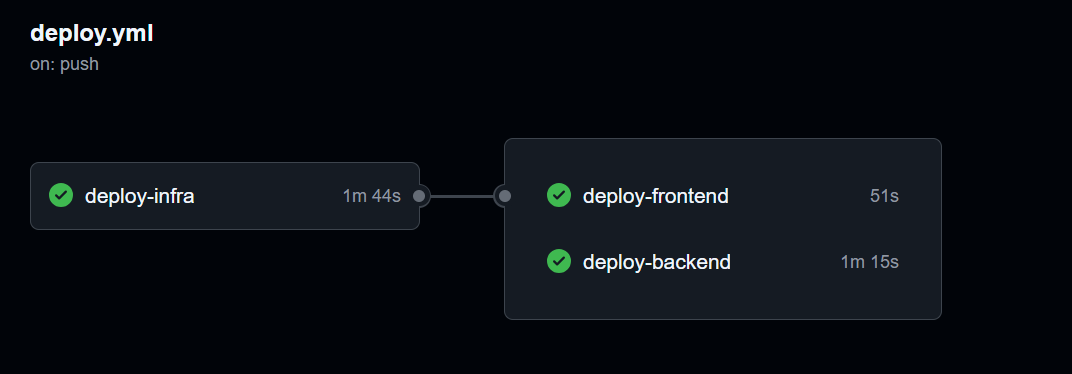
The pipeline has three distinct jobs that run sequentially or in parallel, depending on dependencies.
Job 1: Infrastructure Deployment
This job runs the Bicep file. Crucially, it outputs the names of the resources it created so the later jobs know where to deploy.
deploy-infra: runs-on: ubuntu-latest outputs: # We capture these outputs from the Bicep deployment function_app_name: ${{ steps.deploy.outputs.functionAppName }} storage_account_name: ${{ steps.deploy.outputs.storageAccountName }} steps: - uses: actions/checkout@v4 - uses: azure/arm-deploy@v1 id: deploy with: subscriptionId: ${{ secrets.AZURE_SUBSCRIPTION_ID }} template: ./infra/main.bicepJob 2: Frontend Build & Deploy
This job needs the function_app_name information from Job 1 to construct the API URL.
  deploy-frontend:    needs: deploy-infra # Waits for Infra to finish    runs-on: ubuntu-latest    steps:      - uses: actions/checkout@v4
      # Build the site, injecting the dynamic API URL      - name: Build Astro        run: pnpm run build        env:          PUBLIC_API_URL: https://${{ needs.deploy-infra.outputs.function_app_name }}.azurewebsites.net/api
      # Upload the static files to the Storage Account created in Job 1      - name: Deploy to Storage        uses: azure/CLI@v1        with:          inlineScript: |            az storage blob upload-batch \              --account-name ${{ needs.deploy-infra.outputs.storage_account_name }} \              -d '$web' \              -s ./dist
Job 3: Backend Deployment
Finally, we package our Python code and push it to the Function App.
deploy-backend: needs: deploy-infra runs-on: ubuntu-latest steps: - name: Deploy Function App uses: Azure/functions-action@v1 with: app-name: ${{ needs.deploy-infra.outputs.function_app_name }} package: './api'