Building a Cloud Resume: A DevOps Engineer’s Perspective
Explain how to provision Azure resources using Bicep and build a Python-based serverless API.
As a DevOps engineer, clicking through the Azure Portal to create resources feels like a crime. It’s manual, error-prone, and impossible to version control. When I decided to build my Cloud Resume, I knew I had to do it the “right” way: Infrastructure as Code (IaC) first, Serverless second.
In this post, I’ll walk you through how I architected the backend of my resume using Azure Bicep, Azure Functions (Python), and Cosmos DB.
1. The Architecture
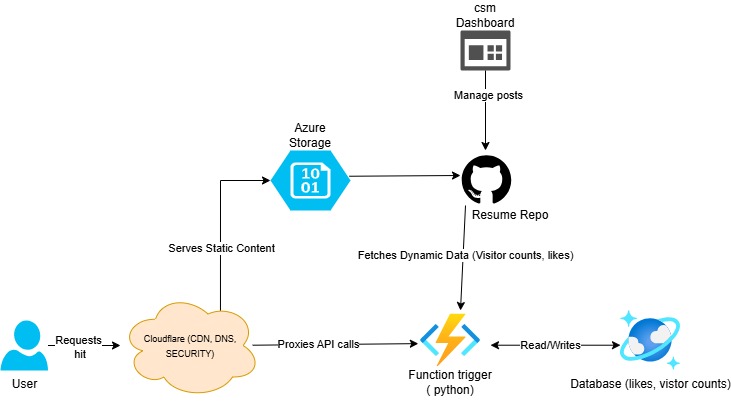 We are using a Serverless architecture:
- Database: Azure Cosmos DB (Serverless tier)
- Compute: Azure Functions (Linux Consumption Plan)
- IaC: Bicep (Native Azure Infrastructure as Code)
Step-by-Step Request Flow
So the idea is that:
-
The Lookup: A person types
samueladebodun.com. Cloudflare’s DNS answers. -
The Handshake: The browser connects to Cloudflare via HTTPS. Cloudflare handles the heavy lifting of encryption.
-
The Fetch: Cloudflare turns around and asks Azure Storage: “Hey, give me index.html for this user.”
-
The Return: Azure Storage hands the file to Cloudflare, which caches it (saving you money on Azure egress fees), then delivers it to the user.
-
The API Call: The user’s browser executes your Svelte JS. It calls your Azure Function (
/api/visitor_count). -
The Check: The Azure Function checks its
corsrules. It sees the request is coming fromsamueladebodun.com(which you allowed in Bicep), so it executes the Python code and talks to Cosmos DB.
2. Infrastructure as Code (Bicep)
- Instead of manual creation, we define our resources in
infra/main.bicep. This ensures our environment is reproducible.
Key Challenge: Getting the Linux Python runtime correctly configured in Bicep. Here is the definition for the Function App. Note the specific linuxFxVersion setting, which is critical for the app to start correctly.
resource functionApp 'Microsoft.Web/sites@2022-09-01' = { name: '${appName}-func' location: location kind: 'functionapp,linux' properties: { serverFarmId: hostingPlan.id siteConfig: { linuxFxVersion: 'Python|3.10' appSettings: [ { name: 'AzureWebJobsStorage' value: 'DefaultEndpointsProtocol=https;AccountName=${storage.name};EndpointSuffix=${environment().suffixes.storage};AccountKey=${storage.listKeys().keys[0].value}' } { name: 'FUNCTIONS_EXTENSION_VERSION' value: '~4' } { name: 'FUNCTIONS_WORKER_RUNTIME' value: 'python' } { name: 'CosmosDbConnectionString' value: cosmosAccount.listConnectionStrings().connectionStrings[0].connectionString } ] cors: { allowedOrigins: [ 'https://samueladebodun.com' 'https://www.samueladebodun.com' 'http://localhost:4321' ] } } httpsOnly: true }}3. The Serverless API (Python)
We need a visitor counter that is atomic and fast. I used the Azure Functions v2 Python model for a clean, decorator-based approach.
The function connects to Cosmos DB, checks for a specific counter item, and increments it.
Visitor Counter Logic
The function connects to Cosmos DB, checks if a “visitor-count” item exists, and increments it.
It also stores likes.
Decided to opt for LocalStorage caching for the visitor counts to prevent inflated figures ( the function ideally counts per page request) instead of increment per device or IP address. So the best and cheapest way to go about it is to use local storage and a 24-hour cool-down to manage the counts
import azure.functions as funcimport azure.cosmos.cosmos_client as cosmos_clientimport osimport jsonimport logging

app = func.FunctionApp()
@app.route(route="health", auth_level=func.AuthLevel.ANONYMOUS)def health(req: func.HttpRequest) -> func.HttpResponse:    """Diagnostic endpoint to check Cosmos DB connectivity"""    try:        connection_string = os.environ.get('CosmosDbConnectionString')        if not connection_string:            return func.HttpResponse(                json.dumps({"status": "error", "message": "CosmosDbConnectionString not set"}),                status_code=500,                mimetype="application/json"            )
        client = cosmos_client.CosmosClient.from_connection_string(connection_string)        database = client.get_database_client("ResumeDB")
        # Check if containers exist        containers = list(database.list_containers())        container_names = [c['id'] for c in containers]
        return func.HttpResponse(            json.dumps({                "status": "ok",                "database": "ResumeDB",                "containers": container_names,                "connection": "successful"            }),            status_code=200,            mimetype="application/json"        )    except Exception as e:        return func.HttpResponse(            json.dumps({"status": "error", "message": str(e), "type": type(e).__name__}),            status_code=500,            mimetype="application/json"        )

@app.route(route="visitor_count", auth_level=func.AuthLevel.ANONYMOUS)def visitor_count(req: func.HttpRequest) -> func.HttpResponse:    logging.info('Processing visitor count request.')
    try:        # Check if this is a read-only request        increment_param = req.params.get('increment', 'true').lower()        should_increment = increment_param != 'false'
        # 1. Connect to Cosmos DB        connection_string = os.environ.get('CosmosDbConnectionString')        if not connection_string:            raise ValueError("CosmosDbConnectionString environment variable is not set.")
        client = cosmos_client.CosmosClient.from_connection_string(connection_string)        database = client.get_database_client("ResumeDB")        container = database.get_container_client("Counter")
        # 2. Define the item ID (single counter)        item_id = "visitor-count"        partition_key = "visitor-count"
        # 3. Try to read the item        try:            item = container.read_item(item=item_id, partition_key=partition_key)
            if should_increment:                # 4. Increment                item['count'] += 1                container.upsert_item(item)
            count = item['count']        except Exception:            if should_increment:                # 5. If item doesn't exist, create it                item = {'id': item_id, 'count': 1}                container.create_item(item)                count = 1            else:                # If read-only and item doesn't exist, return 0                count = 0
        return func.HttpResponse(            json.dumps({"count": count}),            mimetype="application/json",            status_code=200        )
    except Exception as e:        logging.error(f"Error in visitor_count: {str(e)}")        return func.HttpResponse(            json.dumps({"error": str(e)}),            status_code=500,            mimetype="application/json"        )
......
Up Next
In Part 2, I’ll show you the “Ops” side of DevOps: building a multi-stage GitHub Actions pipeline to deploy infrastructure, build the frontend, and automatically ship the backend.